
Downtime response

Andon and Breakdown Alert System for the Shop Floor

The moment a machine stops longer than it should, the right person knows. Every stop gets a reason, every alert gets an acknowledgement, and the biggest losses become visible.

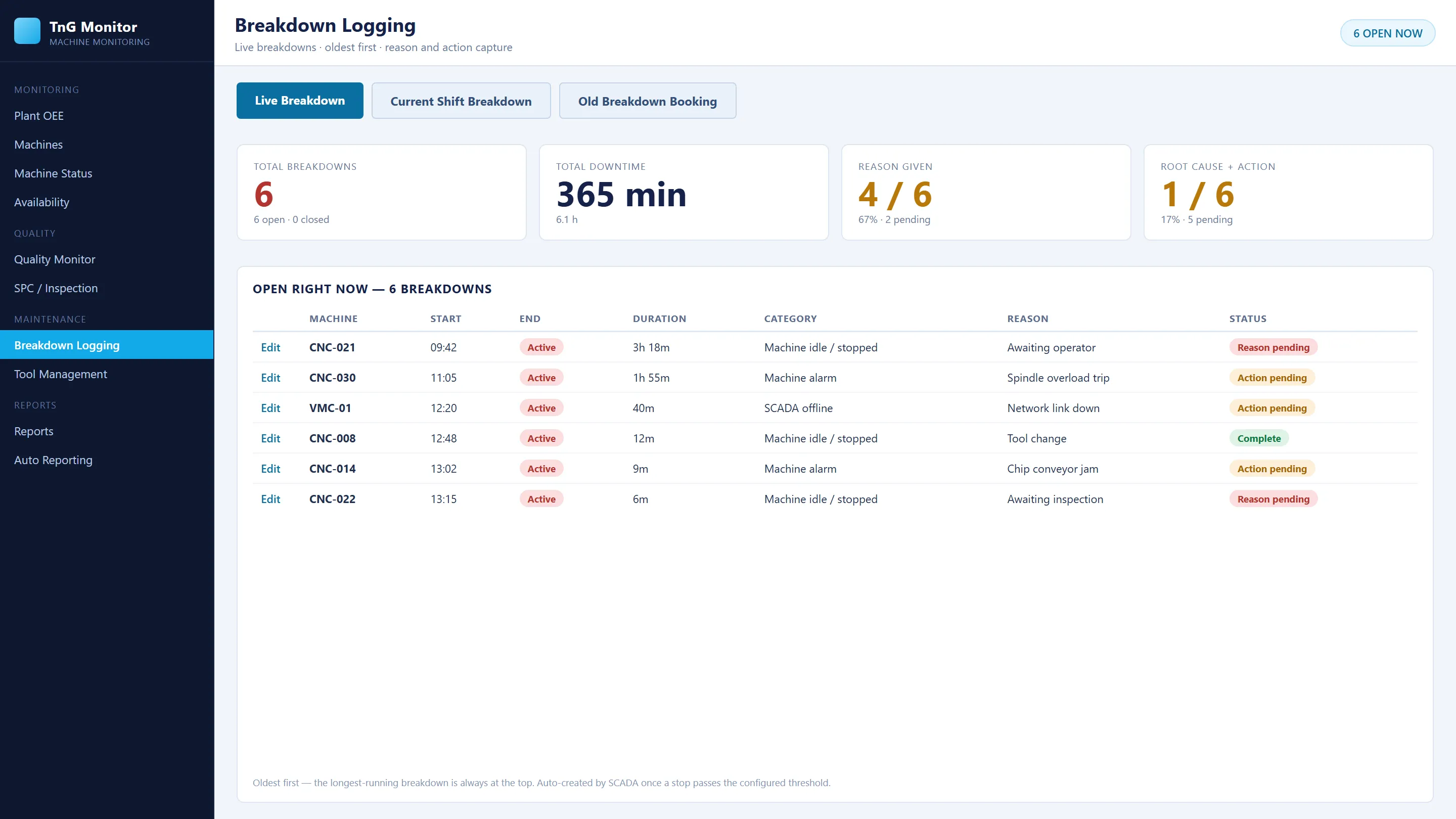
Breakdown logging screen listing open breakdowns with machine, start time, category, reason and status (demonstration data).
AUTOStop beyond the agreed limit opens a breakdown record
2-STEPOperator category plus technician detail
ACKWho acknowledged each alert, recorded
PARETODowntime by reason and machine
How it works

What happens when a machine stops

  1. 01

    Stop detection

    A stop beyond the agreed time limit opens a downtime event.

  2. 02

    Operator category

    The operator records the main reason, such as electrical, mechanical or material waiting.

  3. 03

    Responsible team

    The category routes alerts to a department or named contacts.

  4. 04

    Technician detail

    The technician records the detailed cause, e.g. electrical issue / drive fault.

  5. 05

    Recovery

    Production recovery closes the event under the agreed rules.

Downtime without a reason cannot be improved

The machine stopped for 40 minutes. Was it a tool change, a breakdown, or no material? If nobody records the reason at the moment it happens, the loss disappears into the end-of-shift total, and the same stop happens again tomorrow.

Automatic breakdown records

TnG Machine Monitoring detects every stop from the machine itself. When a stop lasts longer than the agreed limit, a breakdown record opens automatically, with the machine, start time and status. Nobody has to remember to report it.

Reasons in two steps

  1. Operator category: the operator selects the main reason, for example electrical, mechanical or material waiting.
  2. Technician detail: the technician records the detailed cause, for example electrical issue / drive fault.

Both are attached to the same breakdown event, so the record is complete.

The right person, immediately

Each breakdown category is linked to a department or named contacts. Central alert settings manage delivery by email, SMS, Telegram and mobile alerts. Acknowledgement is recorded, so supervisors can see which events are open and who is working on them.

Andon on the shop floor

The Andon view shows every machine on a shop-floor TV: status, target, production and cycle time, colour-coded for running, idle and alarm. Everyone on the floor sees the same picture.
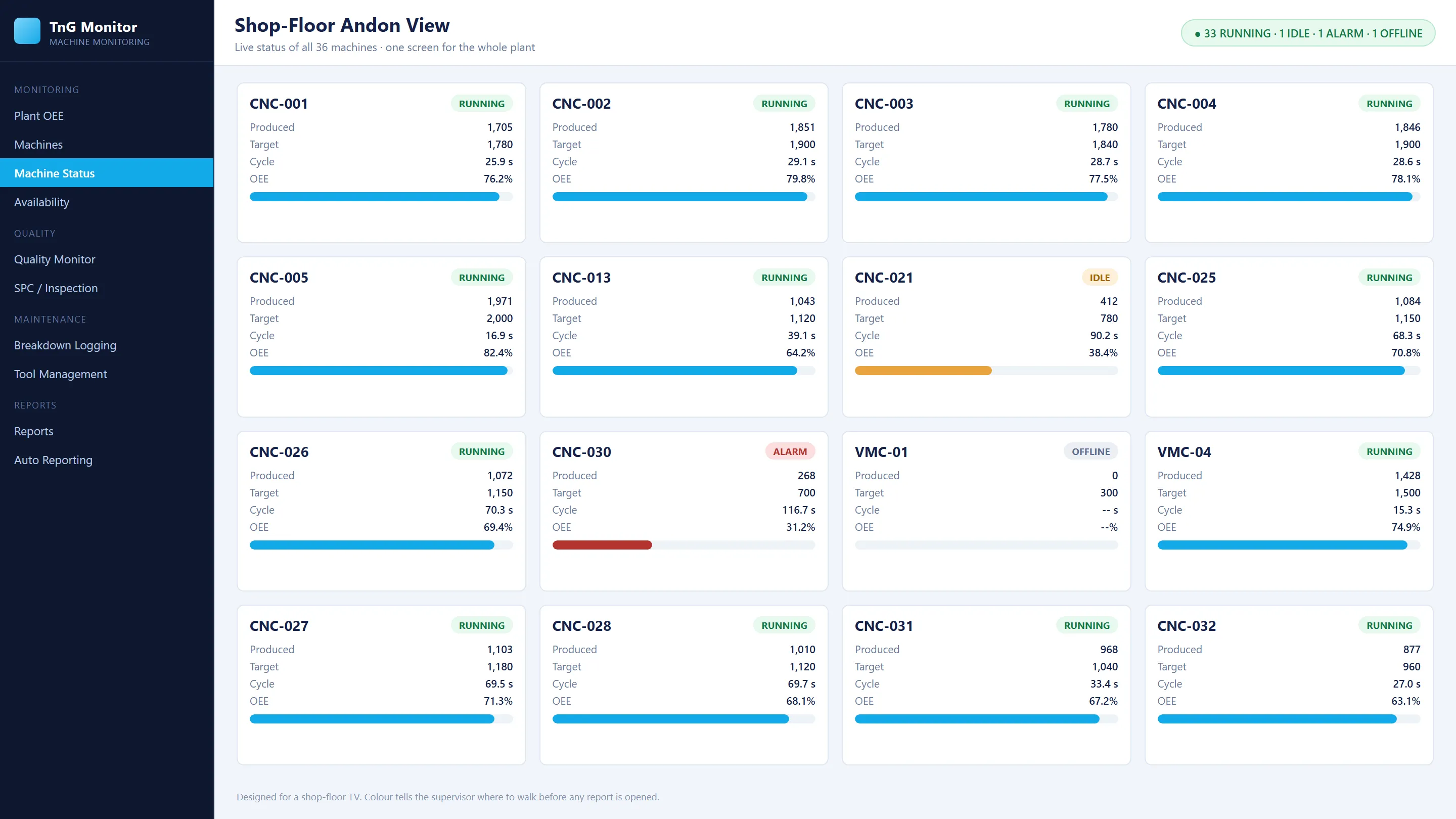
Shop-floor Andon view with machine tiles

Find the biggest losses

Reason Pareto and machine-wise downtime show which few causes cost the most capacity. Breakdown reports can be filtered by machine, date, shift and reason, and scheduled by email.

An example from the floor

Output is behind the shift target, but the reason is unclear. The machine view shows repeated stops. The recorded reasons identify material waiting, and the responsible person was alerted at each stop. The supervisor coordinates material supply, and the team compares material-waiting time and target achievement over the next comparable shifts.
Questions

Frequently asked questions

How are alerts sent?

By email, SMS, Telegram and mobile alerts, routed by breakdown category to the responsible department or named contacts.

Can we see who responded?

Yes. Acknowledgement is recorded, and desktop, web and the mobile app show the same acknowledgement.

Is offline time counted as a breakdown?

No. Offline time remains separately identifiable, so a disconnected machine is not mistaken for a breakdown.

Is there a shop-floor display?

Yes. The Andon view shows every machine's status, target, production and cycle time on a TV, colour-coded for running, idle and alarm.

Talk to us about andon and breakdown alerts

Share your machine list and controller details. We will review compatibility and propose a pilot scope for your plant.